Intro
In this lesson you are going to:
learn about digital forensics and the difference between encoding and encryption strategies. You will also learn about different encoding systems and what they are used for.
In this lesson you are going to:
learn about digital forensics and the difference between encoding and encryption strategies. You will also learn about different encoding systems and what they are used for.
Digital Forensics is the field in cybersecurity that tries to gather and understand evidence after an incident, like a crime, to determine how it happened.
In the Cylab activities you will be working with lots of different types of data. Knowing the difference between encoding and encryption is really helpful. Check out this video to find out
Now we know a bit more about encoding, let's look at one particular encoding method Base64. This is just one way to represent binary data. Click on the image below to find out how it is made.
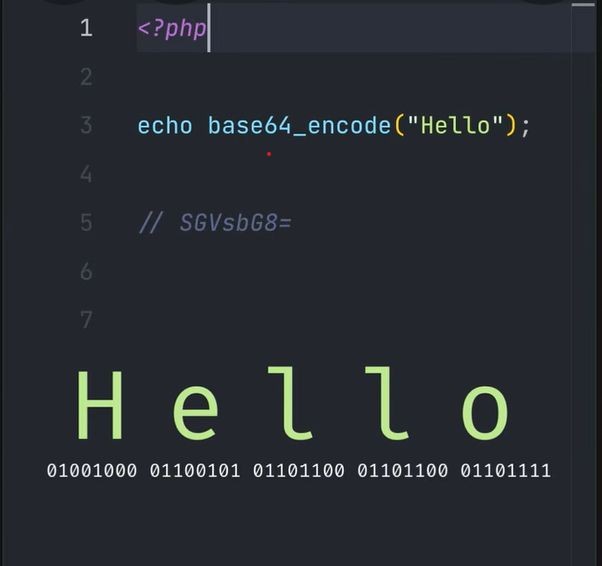
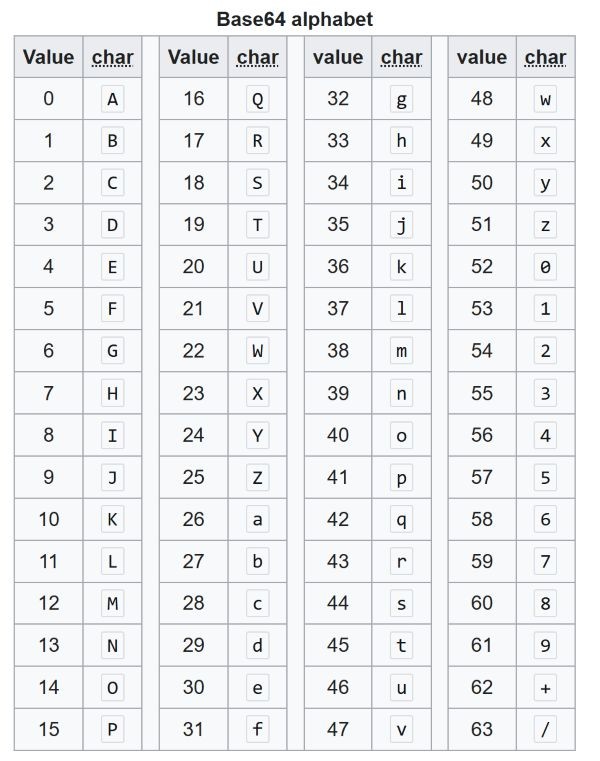
Do you remember how to convert to and from base64? You can check out this video for help:
Or you can go back to the 'Using Cyberchef' section of the 8. Cryptography lesson to find out.
Let's go back to Cylab Academy and complete some activities on Digital Forensics.
These are just a few commands and hints that will help you hack the Digital Forensics challenges.
# exiftool is used to look at file details
$ exiftool filename.txt

# bvi or xxd are used to read binary files (written in hex)
$ bvi filename.bin
$ xxd filename.bin

# cat is used to read a file, even if it is hidden.
$ cat .hiddenfile.txtNavigation using bvi
:$ = go to the end
:^ -=go to the beginning
ctrl + f = go forward a page
ctrl + b = go back a page
Navigation using xxd
xxd automatically goes to the end of the binary file